

Improving Rainfall Accuracy
The Big Picture
One of the most complained about Tempest features is the haptic rainfall sensor. Some people claim Nearcast works great, others think raw rainfall readings are better. From a standpoint of being a novel technology, I personally think Nearcast is very clever approach. "Crowdsourcing" is used successfully in lots of technology.
Weatherflow does not share much detail about their Nearcast system as I am sure it is a well guarded, proprietary mechanism. But it is reasonable to assume it works by sampling data from many Tempest weather stations and using statistical analysis to create an estimate of what it thinks your actual rainfall is.
While the crowdsourcing concept is promising, it needs sufficient saturation of data sources for reasonable accuracy. Even then, one or two poorly installed Tempest stations can throw everything off. Those of you are dedicated weather nuts are familiar with Weather Underground. They "allow" you to upload your weather data so it can be displayed on their website. In actuality, they are crowdsourcing data that they resell to more well known weather organizations like The Weather Channel and Accuweather.
While the Tempest has limited saturation, they have a leg up on Weather Underground because Tempest users are using Tempest systems. This gives Weatherflow more relevant data because all the data comes from their own devices. Weather Underground on the other hand, will take data from anywhere.
As with anything these days, the data is sometimes worth more than the product that generated it. This is okay with me, because it means Weatherfow has an additional source of revenue, and this generally leads to better end user products.
As Tempest weather station owners, we have to 3 things to remember. 1) The Tempest is not a scientific instrument, and 2) The Tempest weather system is designed for recreational weather watchers. As long as we remember these, we will be much happier with our systems.
Weatherflow does not share much detail about their Nearcast system as I am sure it is a well guarded, proprietary mechanism. But it is reasonable to assume it works by sampling data from many Tempest weather stations and using statistical analysis to create an estimate of what it thinks your actual rainfall is.
While the crowdsourcing concept is promising, it needs sufficient saturation of data sources for reasonable accuracy. Even then, one or two poorly installed Tempest stations can throw everything off. Those of you are dedicated weather nuts are familiar with Weather Underground. They "allow" you to upload your weather data so it can be displayed on their website. In actuality, they are crowdsourcing data that they resell to more well known weather organizations like The Weather Channel and Accuweather.
While the Tempest has limited saturation, they have a leg up on Weather Underground because Tempest users are using Tempest systems. This gives Weatherflow more relevant data because all the data comes from their own devices. Weather Underground on the other hand, will take data from anywhere.
As with anything these days, the data is sometimes worth more than the product that generated it. This is okay with me, because it means Weatherfow has an additional source of revenue, and this generally leads to better end user products.
As Tempest weather station owners, we have to 3 things to remember. 1) The Tempest is not a scientific instrument, and 2) The Tempest weather system is designed for recreational weather watchers. As long as we remember these, we will be much happier with our systems.
Identifying the Problem
In my view, there are two main causes of rainfall observation inaccuracies.
The first is installation problems. Many of the installations I have seen on Facebook would be highly suspect as a cause for motion and vibration that would affect rainfall accuracy. Some of these have been in bad locations where obstructions or wind patterns might interfere. Others are simply not solid enough for a pseudo-scientific instrument. Unfortunately, a lot of people buy Tempest systems and think all they need to do is stick it in the yard somewhere and they are going to get super-accurate readings.
Users could get much more accurate readings if they treated the Tempest device as a scientific instrument when designing their mounting system. I understand there are issues unique to every installation. Many users don't have the tools or the ability to fabricate a good mounting system. If this is the case, just keep in mind your station might be somewhat handicapped.
The second cause is the device itself. Even Weatherflow knows there are issues with rainfall accuracy. This is demonstrated by the fact that there is a Nearcast. If these devices were accurate by themselves, there would be no need for Nearcast. It helps smooth out readings so that the incredible becomes credible, and users with difficult installations can still expect better accuracy that the station would otherwise provide.
But the fact that there is a Nearcast system means there is an opportunity for us to contribute as well. After a lot of testing and feedback from users, I think there may be a way to calibrate an individual station without Nearcast.
The first is installation problems. Many of the installations I have seen on Facebook would be highly suspect as a cause for motion and vibration that would affect rainfall accuracy. Some of these have been in bad locations where obstructions or wind patterns might interfere. Others are simply not solid enough for a pseudo-scientific instrument. Unfortunately, a lot of people buy Tempest systems and think all they need to do is stick it in the yard somewhere and they are going to get super-accurate readings.
Users could get much more accurate readings if they treated the Tempest device as a scientific instrument when designing their mounting system. I understand there are issues unique to every installation. Many users don't have the tools or the ability to fabricate a good mounting system. If this is the case, just keep in mind your station might be somewhat handicapped.
The second cause is the device itself. Even Weatherflow knows there are issues with rainfall accuracy. This is demonstrated by the fact that there is a Nearcast. If these devices were accurate by themselves, there would be no need for Nearcast. It helps smooth out readings so that the incredible becomes credible, and users with difficult installations can still expect better accuracy that the station would otherwise provide.
But the fact that there is a Nearcast system means there is an opportunity for us to contribute as well. After a lot of testing and feedback from users, I think there may be a way to calibrate an individual station without Nearcast.
Digging Deeper
Teapot currently has a feature to calibrate rainfall observations. You can provide a percentage correction either higher or lower. While I thought it was a good idea at the time, I now see that this is not the way to do this.
The problem is that we are doing a linear calibration. We are assuming all storms are the same, and all installations are the same. After working with many users and spending many hours observing rainfall patters, the problem is much more clear.
Linear rainfall calibration isn't going to work. In other words, you can't apply a 10% calibration after one storm and assume all other storms will also be 10% off.
Tempest inaccuracies are non-linear. They may be 10% off for medium rainfall rates, 15% off for heavy rain, and 5% off for light rain. Wind can also be a factor. Rainfall inaccuracies may vary at different wind speeds. In fact many users on Facebook have observed different degrees of inaccuracy at different rainfall rates. So, if we want to come up with a calibration that works, it needs to be non-linear. And, it needs to be smart, and get better with each observed storm.
Computers are supposed to help us figure out complicated things and I think this is what we need here. In fact, I started this a few months ago.
If you are using either the Mac or iPad version of Teapot, you may have noticed the "Advanced Settings" item in Teapots settings. When rain is occurring, we get information from Weatherflow with the amount of rain observed every 60 seconds. That allows us to categorize the rain rate and add it to the total for that category. So we can get a good idea of how much heavy, medium, or light rain you received. We also know the wind speed over that period, so we can further categorize rainfall as "medium rain, wind 5-10 MPH" etc.
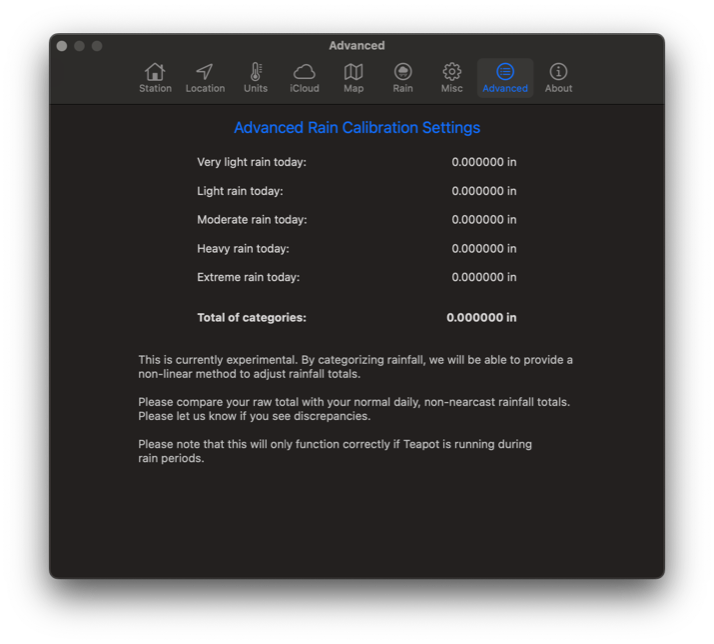
Below is the settings dialog for the Mac version. You can see where I have defined five categories of rainfall intensity. It currently does not do any calibration, but it is interesting to see what the numbers are after a storm.
The problem is that we are doing a linear calibration. We are assuming all storms are the same, and all installations are the same. After working with many users and spending many hours observing rainfall patters, the problem is much more clear.
Linear rainfall calibration isn't going to work. In other words, you can't apply a 10% calibration after one storm and assume all other storms will also be 10% off.
Tempest inaccuracies are non-linear. They may be 10% off for medium rainfall rates, 15% off for heavy rain, and 5% off for light rain. Wind can also be a factor. Rainfall inaccuracies may vary at different wind speeds. In fact many users on Facebook have observed different degrees of inaccuracy at different rainfall rates. So, if we want to come up with a calibration that works, it needs to be non-linear. And, it needs to be smart, and get better with each observed storm.
Computers are supposed to help us figure out complicated things and I think this is what we need here. In fact, I started this a few months ago.
If you are using either the Mac or iPad version of Teapot, you may have noticed the "Advanced Settings" item in Teapots settings. When rain is occurring, we get information from Weatherflow with the amount of rain observed every 60 seconds. That allows us to categorize the rain rate and add it to the total for that category. So we can get a good idea of how much heavy, medium, or light rain you received. We also know the wind speed over that period, so we can further categorize rainfall as "medium rain, wind 5-10 MPH" etc.
Below is the settings dialog for the Mac version. You can see where I have defined five categories of rainfall intensity. It currently does not do any calibration, but it is interesting to see what the numbers are after a storm.
Next Steps
This will need to be done in two phases.
The first step will be to start collecting data. I'll need to start logging rainfall (both raw and Nearcast) and other relevant data like wind speed and direction. Users using the Mac version of Teapot will be able to elect to log this data, review it, and submit it for analysis. By getting storm data from several different stations, it will help in developing a calibration method.
The second phase will be to incorporate the new calibration procedure into Teapot, and let users provide feedback on its accuracy. This will be especially helpful if the user also has a manual rain gauge or a different system like a Davis, Accurite, or other system that the user trusts for rainfall data.
The first step will be to start collecting data. I'll need to start logging rainfall (both raw and Nearcast) and other relevant data like wind speed and direction. Users using the Mac version of Teapot will be able to elect to log this data, review it, and submit it for analysis. By getting storm data from several different stations, it will help in developing a calibration method.
The second phase will be to incorporate the new calibration procedure into Teapot, and let users provide feedback on its accuracy. This will be especially helpful if the user also has a manual rain gauge or a different system like a Davis, Accurite, or other system that the user trusts for rainfall data.
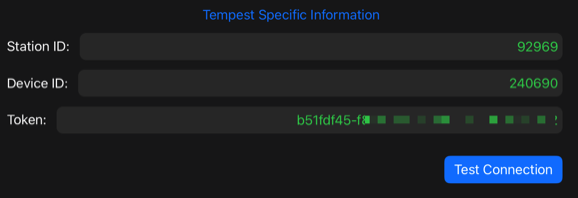
After pasting in your IDs and Token, tap the Test Connection button to validate your settings.
If you are typing your token in manually, please note that is is case sensitive.
If you are typing your token in manually, please note that is is case sensitive.
Now, you can get out of the Settings area and your device should already be working.